
EPFO Pensioners Portal
Once you start getting the pension, the need for the EPFO pensioner portal arises. It helps you check your pension details, download slips, and manage basic information online without visiting any office. In simple words, it makes pension-related tasks easy, quick, and accessible from home.
What is the EPFO Pensioners Portal?
The EPFO Pensioners Portal is an online platform provided by the Employees' Provident Fund Organisation (EPFO) for pensioners to manage their pension-related services.
Through this portal, pensioners can check their pension details, download pension slips, view payment status, and access important information using their PPO number or other login details.
In simple terms, it helps pensioners handle their pension work easily without visiting the EPFO office.
Who Can Use the EPFO Pensioners Portal
Here is the list of people who can use the EPFO pensioners portal:
- 01
EPFO pensioners receiving pension under EPS
- 02
Retired employees eligible for EPFO pension
- 03
Family pensioners (spouse or nominee)
- 04
Users with a valid PPO number
More About EPFO and Its Services
EPFO Pensioners Login Process
The EPFO Pensioners Portal service-based access system, not a dashboard login. You have to log in separately for each service. Here is the process for EPFO pension portal login:
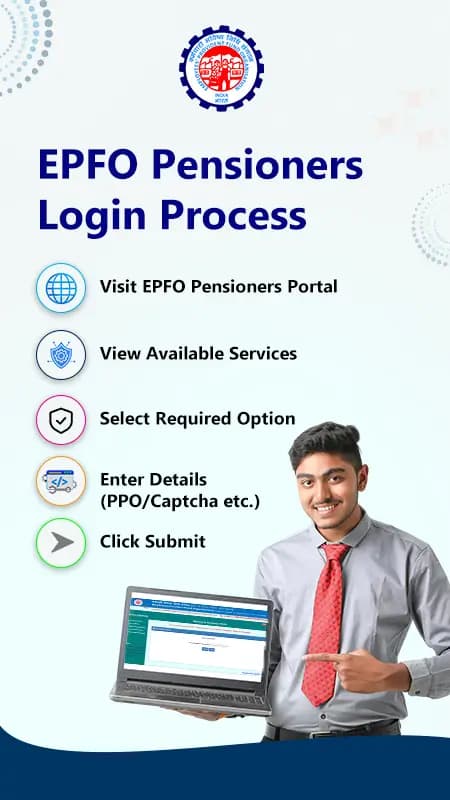
Visit EPFO Pensioners PortalView Available ServicesSelect Required OptionEnter Details (PPO/Captcha etc.)Click SubmitView Results- Step 1
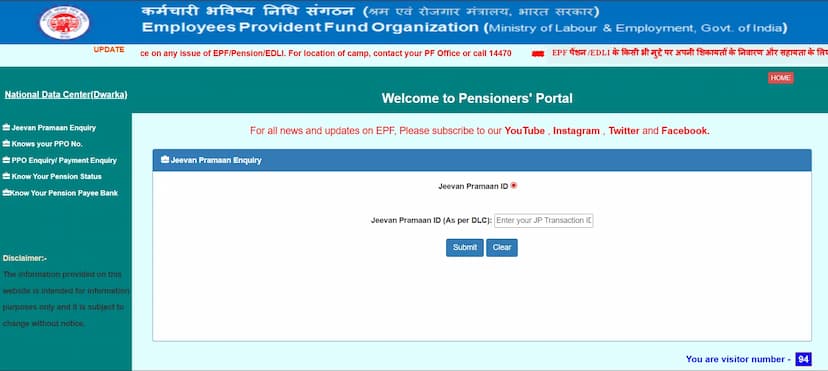
Visit the official EPFO pensioners portal.
- Step 2
On the homepage, you will see multiple options such as:
Jeevan Pramaan Enquiry, Know Your PPO No., PPO Enquiry/Payment Enquiry, Know Your Pension Status, and Know Your Pension Payee Bank.
- Step 3
Select the option as per your requirement.
- Step 4
Enter the required details, such as PPO number and captcha.
- Step 5
Click on submit.
Details Required for EPFO Pensioners Login
Here are the details required for the EPFO pensioners portal login:
| Service | Details Required |
|---|---|
| Jeevan Pramaan Enquiry | Jeevan Pramaan ID |
| Know Your PPO Number | Bank Account Number or Member ID |
| PPO Enquiry / Payment Enquiry | Issued Office, Office ID, PPO Number, Pensioner’s Date of Birth, Captcha |
| Know Your Pension Status | Issued Office, Office ID, PPO Number |
| Know Your Pension Payee Bank | Select Office from the list |
What is the PPO Number?
PPO or Pension Payment Order is a unique number given to every pensioner under the EPF scheme. It is used to identify and track all pension-related details and transactions.
This is a 12-digit number, which includes:
| PPO Digit Position | Meaning |
|---|---|
| First 5 digits | Code of the office that issued the PPO |
| 6th and 7th digits | Year in which the PPO was issued |
| 8th to 11th digits | Sequence number of the PPO |
| 12th digit | Check digit used for verification |
EPFO Pensioners Portal via UMANG App
You can also access EPFO pension services through the UMANG App, which provides easy access on your mobile.
Download & Open UMANG AppLogin with Mobile & OTPGo to EPFO ServicesSelect Pensioner ServiceEnter Details (PPO etc.)SubmitView Details- Step 1
Download and open the UMANG App.
- Step 2
Log in using your mobile number and OTP.
- Step 3
Go to the EPFO services.
- Step 4
Select pensioner-related services
- Step 5
Enter the required details, such as the PPO number.
- Step 6
Submit to view your details.
Services Available on EPFO Pensioners Portal
The EPFO Pensioners Portal provides different services, which are as follows:
Jeevan Pramaan EnquiryYou can easily check the status of your Digital Life Certificate (DLC) under this section.Know Your PPO NumberYou will find your PPO number using your bank account number or Member ID.PPO Enquiry / Payment EnquiryThis option will help you to view pension details, payment history, and transaction status.
Know Your Pension StatusA pensioner can quickly check whether their pension is approved and being processed.
Know Your Pension Payee BankThis service provides details of the bank where your pension is credited.
How to Check EPFO Pension Status
This is one of the services provided under the EPFO pension portal. To access this, follow the given steps:
Visit EPFO Pension PortalClick “Know Your Pension Status”Enter Details (Office, Office ID, PPO)Click “Get Status”View Status- Step 1
Start by visiting the official EPFO pension portal.
- Step 2
Now, click on the know your pension status.
- Step 3
Fill in the details such as the issuing office, office ID, and PPO number.
- Step 4
Then, click on the Get Status option.
How to Download EPFO Pension Slip
You can download your EPFO pension slip online by following these simple steps:
Visit EPFO Pensioners PortalSelect “PPO Enquiry / Payment Enquiry”Enter Details (PPO, DOB, Captcha)Click SubmitView Pension DetailsDownload/Save Pension Slip- Step 1
Visit the official EPFO Pensioners Portal.
- Step 2
Select the PPO Enquiry / Payment Enquiry option.
- Step 3
Enter details like PPO number, date of birth, and captcha.
- Step 4
Click on submit.
- Step 5
Your pension details will be displayed on the screen.
- Step 6
Download or save the pension slip for your records.
Where to Find PPO Number in EPFO Pension Portal?
You can easily find your PPO number using the EPFO Pensioners Portal:
Visit EPFO Pensioners PortalSelect “Know Your PPO Number”Enter Bank Account Number/Member IDEnter CaptchaClick SubmitView PPO Number- Step 1
Visit the official EPFO Pensioners Portal.
- Step 2
Select the “Know Your PPO Number” option.
- Step 3
Enter your bank account number or Member ID.
- Step 4
Fill in the captcha.
- Step 5
Click on submit.
How to Submit Digital Life Certificate (Jeevan Pramaan)?
You can submit and access your Digital Life Certificate (DLC) online using the Jeevan Pramaan system:
Open Jeevan Pramaan Portal/AppEnter Pramaan IDEnter CaptchaClick “Generate OTP”Enter OTPSign InDownload Digital Life Certificate- Step 1
Visit the Jeevan Pramaan portal or open the app.
- Step 2
Enter your Pramaan ID (Jeevan Pramaan ID).
- Step 3
Fill in the captcha code.
- Step 4
Click on Generate OTP.
- Step 5
Enter the OTP received on your registered mobile number.
- Step 6
Sign in and download your Digital Life Certificate.
FAQs
The EPFO pensioners portal is an online platform where pensioners can check their pension details, status, and payment information easily.
You can use the EPFO pension portal by selecting the required service and entering details like PPO number or other information as asked.
No, there is no fixed login system. You need to select a service and enter the required details to access information.
To access the EPFO pension portal login services, choose the option you need (like pension status or PPO enquiry) and enter the required details to proceed.
EPFO pensioners, retired employees under EPS, and family pensioners with a valid PPO number can use the portal.
You can check pension status, view payment details, find your PPO number, and access life certificate information.
There is no fixed login system. You need to select a service and enter the correct details based on that option.
Select “Know Your Pension Status,” enter details like PPO number and office details, and submit to view status.